
[1] 0.009BCB744 Biostatistics Self-Assessment Questions and Answers
This document gathers the self-assessment questions and model answers from the biostatistics chapters. Answers are shown by default here. The chapter versions retain only the questions.
2. Summarising Biological Data
ImportantSelf-Assessment Task 2-1
How would you manually calculate the mean value for the normal_data we generated in the lecture? (/3)
Answer
- ✓✓✓ The mean value of the
normal_datais calculated by summing all the data points and dividing by the number of data points. Assign three marks if they correctly calculate the mean of thenormal_datawithout using the functionmean().
ImportantSelf-Assessment Task 2-2
Find the faithful dataset and describe both variables in terms of their measures of central tendency. Include graphs in support of your answers (use ggplot()), and conclude with a brief statement about the data distribution. (/10)
Answer
# Load the faithful dataset
data(faithful)
library(ggpubr)

plt1 <- ggplot(faithful, aes(x = eruptions)) +
  geom_histogram(fill = "lightblue", colour = "black") +
  labs(title = "Eruptions", x = "Duration (minutes)", y = "Frequency") +
  theme_minimal()

plt2 <- ggplot(faithful, aes(x = waiting)) +
  geom_histogram(fill = "lightgreen", colour = "black") +
  labs(title = "Waiting", x = "Time (minutes)", y = "Frequency") +
  theme_minimal()

# Arrange the plots side by side
ggarrange(plt1, plt2, ncol = 2)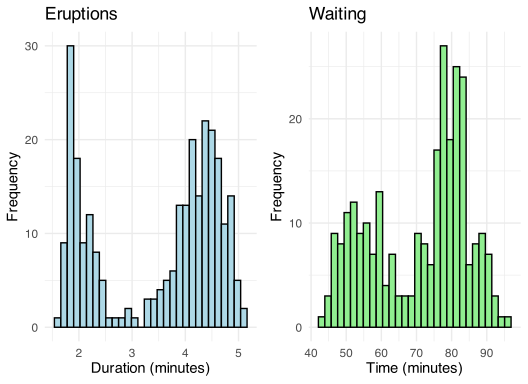
[1] -1.511605[1] -1.156263[1] -0.4135498[1] -0.414025The faithful dataset contains data on the Old Faithful geyser in Yellowstone National Park. It measures the eruption duration (in minutes) and the waiting time between eruptions (also in minutes). We use both graphical and statistical measures to understand the central tendency and overall distribution of each variable.
1. Eruption Duration
Using ggplot2, the histogram of eruption durations reveals a bimodal distribution — one cluster of short eruptions around 2 minutes, another around 4.3 minutes. This visible separation implies that computing a single mean or median would obscure meaningful structural information in the data.
Statistical measures of central tendency support the visual impression:
- Skewness = -0.4135
- Kurtosis = -1.5116
The negative skewness suggests a slight asymmetry with a longer left tail, though the bimodal structure renders this value difficult to interpret in isolation. The negative kurtosis implies a flatter distribution compared to a normal curve — again, a consequence of the data’s underlying bimodality.
2. Waiting Time
The histogram for waiting times similarly displays two overlapping modes, with denser regions around 55, 80 minutes.
The numerical descriptors are:
- Skewness = -0.4140
- Kurtosis = -1.1563
As with eruption durations, the slightly negative skew, platykurtic (low kurtosis) profile again reflect a flattened and spread-out distribution — not tightly peaked, and not symmetric.
3. Conclusion About the Data’s Distribution
Due to the bimodal nature of the measured variables, neither conforms to expectations of central tendency characterisation. Yes, we can compute mean, median values but their interpretive value is diminished in the presence of this obvious bimodality. This indicates a structural feature of the physical process operating there (i.e. not merely a statistical artefact), suggestive of two regimes of geyser activity (short/long eruptions, brief/long waits).
The skewness and kurtosis figures reinforce the visual presentation of the data structure: the distributions are asymmetrical and flatter than a normal curve and make parametric assumptions (e.g., normality in linear models) poorly-suited (unless stratified, transformed in some way or another). The histograms and moment-based statistics highlight the need to interrogate shape and structure — not merely central values — and would suggest that a more detailed approach is taken to studying the processes operating there.
ImportantSelf-Assessment Task 2-3
Manually calculate the variance and SD for the normal_data we generated in the lecture. Make sure your answer is the same as those reported there. (/5)
Answer
ImportantSelf-Assessment Task 2-4
Write a few lines of code to demonstrate that the \((0-0.25]\), \((0.25-0.5]\), \((0.5-0.75]\),\((0.75-1]\) quantiles of the normal_data we generated in the lecture indeed conform to the formal definition for what quantiles are. I.e., show manually how you can determine that 25% of the observations indeed fall below -0.66 for the normal_data. Explain the rationale to your approach. (/10)
Answer
# Generate random data from a normal distribution
set.seed(666)
n <- 5000 # Number of data points
mean <- 0
sd <- 1
normal_data <- rnorm(n, mean, sd)

# Calculate the quantiles
q_25 <- quantile(normal_data, p = 0.25)
q_50 <- quantile(normal_data, p = 0.50)
q_75 <- quantile(normal_data, p = 0.75)
q_100 <- quantile(normal_data, p = 1.00)

# Verify each quantile interval
(count_0_to_25 <- sum(normal_data <= q_25))
(count_25_to_50 <- sum(normal_data > q_25 & normal_data <= q_50))
(count_50_to_75 <- sum(normal_data > q_50 & normal_data <= q_75))
(count_75_to_100 <- sum(normal_data > q_75 & normal_data <= q_100))

# Calculate percentages
(perc_0_to_25 <- count_0_to_25 / n * 100)
(perc_25_to_50 <- count_25_to_50 / n * 100)
(perc_50_to_75 <- count_50_to_75 / n * 100)
(perc_75_to_100 <- count_75_to_100 / n * 100)

# Make a figure to visualise
library(ggplot2)
ggplot(data.frame(x = normal_data), aes(x = x)) +
  geom_histogram(binwidth = 0.5, fill = "lightblue", colour = "black") +
  geom_vline(xintercept = c(q_25, q_50, q_75), colour = c("red", "blue", "green"), linetype = "dashed") +
  labs(title = "Histogram of normal_data with quantiles", x = "Value", y = "Frequency") +
  theme_minimal()
To demonstrate that the \((0-0.25]\), \((0.25-0.5]\), \((0.5-0.75]\),\((0.75-1]\) quantiles of our generated normal_data conform to the formal definition of quantiles, we must verify that approximately 25% of observations fall within each quantile interval. The formal definition states that the \(p\)-th quantile is a value \(q_p\) such that the proportion of observations less than or equal to \(q_p\) is approximately \(p\).
Approach
In practice, there are three key steps:
Compute the quantiles using the
quantile()function.-
Count observations in each quantile interval by using logical expressions to filter the data:
- For the first interval \((0-0.25]\): count values \(\leq q_{0.25}\)
- For the second interval \((0.25-0.5]\): count values \(> q_{0.25}\)\(\leq q_{0.50}\)
- For the third interval \((0.5-0.75]\): count values \(> q_{0.50}\)\(\leq q_{0.75}\)
- For the fourth interval \((0.75-1]\): count values \(> q_{0.75}\)
Convert counts to percentages by dividing by the total number of observations and multiplying by 100.
ImportantSelf-Assessment Task 2-5
- Explain the output of
dimnames()when applied to thepenguinsdataset. (/2) - Explain the output of
str()when applied to thepenguinsdataset. (/3)
Answer
[[1]]
  [1] "1"   "2"   "3"   "4"   "5"   "6"   "7"   "8"   "9"   "10"  "11"  "12"
 [13] "13"  "14"  "15"  "16"  "17"  "18"  "19"  "20"  "21"  "22"  "23"  "24"
 [25] "25"  "26"  "27"  "28"  "29"  "30"  "31"  "32"  "33"  "34"  "35"  "36"
 [37] "37"  "38"  "39"  "40"  "41"  "42"  "43"  "44"  "45"  "46"  "47"  "48"
 [49] "49"  "50"  "51"  "52"  "53"  "54"  "55"  "56"  "57"  "58"  "59"  "60"
 [61] "61"  "62"  "63"  "64"  "65"  "66"  "67"  "68"  "69"  "70"  "71"  "72"
 [73] "73"  "74"  "75"  "76"  "77"  "78"  "79"  "80"  "81"  "82"  "83"  "84"
 [85] "85"  "86"  "87"  "88"  "89"  "90"  "91"  "92"  "93"  "94"  "95"  "96"
 [97] "97"  "98"  "99"  "100" "101" "102" "103" "104" "105" "106" "107" "108"
[109] "109" "110" "111" "112" "113" "114" "115" "116" "117" "118" "119" "120"
[121] "121" "122" "123" "124" "125" "126" "127" "128" "129" "130" "131" "132"
[133] "133" "134" "135" "136" "137" "138" "139" "140" "141" "142" "143" "144"
[145] "145" "146" "147" "148" "149" "150" "151" "152" "153" "154" "155" "156"
[157] "157" "158" "159" "160" "161" "162" "163" "164" "165" "166" "167" "168"
[169] "169" "170" "171" "172" "173" "174" "175" "176" "177" "178" "179" "180"
[181] "181" "182" "183" "184" "185" "186" "187" "188" "189" "190" "191" "192"
[193] "193" "194" "195" "196" "197" "198" "199" "200" "201" "202" "203" "204"
[205] "205" "206" "207" "208" "209" "210" "211" "212" "213" "214" "215" "216"
[217] "217" "218" "219" "220" "221" "222" "223" "224" "225" "226" "227" "228"
[229] "229" "230" "231" "232" "233" "234" "235" "236" "237" "238" "239" "240"
[241] "241" "242" "243" "244" "245" "246" "247" "248" "249" "250" "251" "252"
[253] "253" "254" "255" "256" "257" "258" "259" "260" "261" "262" "263" "264"
[265] "265" "266" "267" "268" "269" "270" "271" "272" "273" "274" "275" "276"
[277] "277" "278" "279" "280" "281" "282" "283" "284" "285" "286" "287" "288"
[289] "289" "290" "291" "292" "293" "294" "295" "296" "297" "298" "299" "300"
[301] "301" "302" "303" "304" "305" "306" "307" "308" "309" "310" "311" "312"
[313] "313" "314" "315" "316" "317" "318" "319" "320" "321" "322" "323" "324"
[325] "325" "326" "327" "328" "329" "330" "331" "332" "333" "334" "335" "336"
[337] "337" "338" "339" "340" "341" "342" "343" "344"

[[2]]
[1] "species"           "island"            "bill_length_mm"
[4] "bill_depth_mm"     "flipper_length_mm" "body_mass_g"
[7] "sex" "year" tibble [344 × 8] (S3: tbl_df/tbl/data.frame)
$ species : Factor w/ 3 levels "Adelie","Chinstrap",..: 1 1 1 1 1 1 1 1 1 1 ...
$ island : Factor w/ 3 levels "Biscoe","Dream",..: 3 3 3 3 3 3 3 3 3 3 ...
$ bill_length_mm : num [1:344] 39.1 39.5 40.3 NA 36.7 39.3 38.9 39.2 34.1 42 ...
$ bill_depth_mm : num [1:344] 18.7 17.4 18 NA 19.3 20.6 17.8 19.6 18.1 20.2 ...
$ flipper_length_mm: int [1:344] 181 186 195 NA 193 190 181 195 193 190 ...
$ body_mass_g : int [1:344] 3750 3800 3250 NA 3450 3650 3625 4675 3475 4250 ...
$ sex : Factor w/ 2 levels "female","male": 2 1 1 NA 1 2 1 2 NA NA ...
$ year : int [1:344] 2007 2007 2007 2007 2007 2007 2007 2007 2007 2007 ...
ImportantSelf-Assessment Task 2-6
Explain the output of summary() when applied to the penguins dataset. (/3)
Answer
- The
summary()function provides a concise summary (obviously) of the dataset’s numerical variables. It includes the minimum, 1st quartile, median, mean, 3rd quartile, and maximum values for each variable (i.e. central tendency, some view of the dispersion). For categorical variables and it shows the frequency of each level. We caqn gain some basic insight into the distribution of the data and identify potential outliers or missing values. -
- We can see that the penguin’s bill depth (in mm) is close to normally distributed given that the mean value of 17.15 mm is very close to the median of 17.30 mm, with the minimum, maximum values at 13.10 mm and 21.50 mm and respectively. There are two missing values here. The bill length, however, is slightly skewed to the right with a mean of 43.92 mm, a median of 44.45 mm…
ImportantSelf-Assessment Task 2-7
Why is it important to consider the grouping structures that might be present within our datasets? (/2)
Answer
Simpson’s Paradox: Relationships seen in grouped data can reverse/disappear when examining subgroups separately.
Heterogeneity: Different groups within data often exhibit distinct statistical properties. A a single mean (and/or SD) across all observations masks this variability and can provide a distorted view of the real phenomena.
Statistical Independence: Many statistical tests assume independence of observations. If data contain hierarchical or nested structures (e.g., individuals within ecosystems, repeated measurements from the same subjects), this assumption is violated, might invalidate statistical inferences.
Group-Specific Insights: Analysing data by relevant groupings (e.g. a population of a flowering plant in different climatic regions or time periods) may show relevant patterns and differences that would otherwise remain hidden in aggregate statistics.
So, if we do not account for group structures, summary statistics may reflect artificial central tendencies, dispersions that do not realistically represent any meaningful subpopulation within the data. This limits the validity and usefulness of the analysis.
3. Visualising Data
ImportantSelf-Assessment Task 3-1
-
Using a tidy workflow, assemble a summary table of the palmerpenguins dataset that has a similar appearance as that produced by
psych::describe(penguins). (/5)- For bonus marks (which will not count anything), apply a beautiful, creative styling to the table using the kable package. Try and make it as publication ready as possible. Refer to a few journal articles to see how to professionally typeset tables.
Still using the palmerpenguins dataset, perform an exploratory data analysis to investigate the relationship between penguin species, their morphological traits (bill length and bill depth, flipper length, and body mass). Employ the tidyverse approaches learned earlier in the module to explore the data, account for the grouping structures present within the dataset. (/10)
Provide visualisations (use Figure 4 as inspiration) and summary statistics to support your findings and elaborate on any observed patterns or trends. (/10)
Ensure your presentation is professional and adhere to the standards required by scientific publications. State the major aims of your analysis and the patterns you seek. Using the combined findings from the EDA and the figures produced here, discuss the findings in a formal Results section. (/5)
Answer
a. (/5)
A tidy workflow selects numeric columns, pivots to long form, and summarises across all variables simultaneously. The resulting table should include the same statistics that psych::describe() reports: number of observations, mean, standard deviation, median, minimum, maximum, range, skewness, and kurtosis.
library(palmerpenguins)

penguins_summary <- penguins |>
  select(where(is.numeric)) |>
  pivot_longer(everything(), names_to = "variable", values_to = "value") |>
  group_by(variable) |>
  summarise(
    n       = sum(!is.na(value)),
    mean    = round(mean(value, na.rm = TRUE), 2),
    sd      = round(sd(value, na.rm = TRUE), 2),
    median  = round(median(value, na.rm = TRUE), 2),
    min     = round(min(value, na.rm = TRUE), 2),
    max     = round(max(value, na.rm = TRUE), 2),
    range   = round(max - min, 2),
    skew    = round(e1071::skewness(value, na.rm = TRUE), 2),
    kurtosis = round(e1071::kurtosis(value, na.rm = TRUE), 2)
  )

if (knitr::is_html_output()) {
  library(kableExtra)
  penguins_summary |>
    knitr::kable("html", align = "lrrrrrrrrr") |>
    kable_styling("striped", full_width = FALSE)
} else {
  penguins_summary |>
    knitr::kable(align = "lrrrrrrrrr")
}
b. (/10)
The EDA should compare the four morphological traits across the three species using appropriate grouped visualisations. Pivoting to long format enables faceting by trait, which is the most compact way to show all four comparisons at once.
penguins |>
  select(species, bill_length_mm, bill_depth_mm, flipper_length_mm, body_mass_g) |>
  pivot_longer(-species, names_to = "trait", values_to = "value") |>
  mutate(trait = recode(trait,
    bill_length_mm    = "Bill length (mm)",
    bill_depth_mm     = "Bill depth (mm)",
    flipper_length_mm = "Flipper length (mm)",
    body_mass_g       = "Body mass (g)"
  )) |>
  ggplot(aes(x = species, y = value, fill = species)) +
  geom_boxplot(outlier.size = 1, alpha = 0.8) +
  geom_jitter(width = 0.12, alpha = 0.3, size = 0.8) +
  facet_wrap(~trait, scales = "free_y") +
  labs(x = "Species", y = NULL, fill = "Species") +
  theme_grey() +
  theme(legend.position = "none")
c. (/10)
Summary statistics per species provide numerical support for the visual patterns. At least one bivariate scatter plot is expected, since the question invites exploration of relationships between traits.
penguins_by_species <- penguins |>
  group_by(species) |>
  summarise(across(
    c(bill_length_mm, bill_depth_mm, flipper_length_mm, body_mass_g),
    list(mean = \(x) round(mean(x, na.rm = TRUE), 1),
         sd   = \(x) round(sd(x,   na.rm = TRUE), 1)),
    .names = "{.col}_{.fn}"
  ))

if (knitr::is_html_output()) {
  library(kableExtra)
  penguins_by_species |>
    knitr::kable("html") |>
    kable_styling("striped", full_width = FALSE)
} else {
  penguins_by_species |>
    knitr::kable()
}
penguins |>
ggplot(aes(x = bill_length_mm, y = bill_depth_mm,
colour = species, shape = species)) +
geom_point(alpha = 0.7, size = 1.8) +
geom_smooth(method = "lm", se = FALSE, linewidth = 0.7) +
labs(x = "Bill length (mm)", y = "Bill depth (mm)",
colour = "Species", shape = "Species") +
theme_grey()The summary table and scatter plot together reveal the major structure in the data. Gentoo penguins are the largest species by both body mass (mean ≈ 5092 g) and flipper length (mean ≈ 217 mm). Adélie and Chinstrap penguins are similar in overall size but differ clearly in bill dimensions: Adélie bills are shorter and deeper, while Chinstrap bills are longer and shallower. The bill length–depth scatter plot illustrates a within-species positive relationship that is obscured in the pooled data by a between-species negative association — a pattern worth noting explicitly in the Results.
d. (/5)
The written response should state what was investigated, what patterns were expected or sought, and then present the findings in the structured style of a journal Results section.
Example Results paragraph:
We characterised variation in four morphological traits — bill length, bill depth, flipper length, and body mass — across three Pygoscelis species to assess the degree of interspecific differentiation and to identify which traits most clearly separate species. Gentoo penguins (P. papua) were the largest species by both body mass (mean ± SD: 5092 ± 501 g) and flipper length (217 ± 7 mm), exceeding the other two species by approximately 1000 g and 20 mm respectively. Adélie (P. adeliae) and Chinstrap (P. antarcticus) penguins were similar in overall body size but differed substantially in bill morphology: Adélie penguins had shorter (38.8 ± 2.7 mm), deeper bills (18.3 ± 1.2 mm), whereas Chinstrap penguins had longer (48.8 ± 3.3 mm), shallower bills (18.4 ± 1.1 mm). A scatter plot of bill length against bill depth revealed that the within-species relationship between these dimensions is positive in all three species, but that the among-species pattern reverses direction — an artefact of species-level size differences that would produce a misleading negative correlation in a pooled analysis.
7. t-Tests
ImportantSelf-Assessment Task 7-1
Please refer to this two-sided two-sample t-test:
# random normal data
set.seed(666)
r_two <- data.frame(dat = c(rnorm(n = 20, mean = 4, sd = 1),
                            rnorm(n = 20, mean = 5, sd = 1)),
                    sample = c(rep("A", 20), rep("B", 20)))

# perform t-test
# note how we set the `var.equal` argument to TRUE because we know
# our data has the same SD (they are simulated as such!)
t.test(dat ~ sample, data = r_two, var.equal = TRUE)- Repeat this analyses using the Welch’s
t.test(). (/5) - Repeat your analysis, above, using the even more old-fashioned Equation 4 in the lecture. Show the code, talk us through the step you followed to read the p-values off the table of t-statistics. (/10)
Answer
a. (/5)
Welch’s t-test differs from Student’s t-test in one key respect: it does not assume equal variances between the two groups. In R, the only change required is setting var.equal = FALSE.
The t-statistic and p-value are nearly identical to the Student’s test in this case because the sample variances happen to be close, but the degrees of freedom differ: Welch’s test produces a non-integer df (here around 37.9) via the Welch–Satterthwaite equation, whereas Student’s test gives an integer df of 38.
b. (/10)
The Welch t-statistic for the difference of two means is:
\[t = \frac{\bar{A} - \bar{B}}{\sqrt{\dfrac{S_A^2}{n} + \dfrac{S_B^2}{m}}}\]
where \(S_A^2\) and \(S_B^2\) are the sample variances and \(n\), \(m\) are the sample sizes. The degrees of freedom are obtained from the Welch–Satterthwaite equation:
\[d.f. = \frac{\left(\dfrac{S_A^2}{n} + \dfrac{S_B^2}{m}\right)^{2}}{\dfrac{S_A^4}{n^2(n-1)} + \dfrac{S_B^4}{m^2(m-1)}}\]
xA <- r_two$dat[r_two$sample == "A"]
xB <- r_two$dat[r_two$sample == "B"]

# t-statistic
t_stat <- (mean(xA) - mean(xB)) /
  sqrt(var(xA) / length(xA) + var(xB) / length(xB))

# Welch-Satterthwaite degrees of freedom
se2_A <- var(xA) / length(xA)
se2_B <- var(xB) / length(xB)

df_welch <- (se2_A + se2_B)^2 /
  (se2_A^2 / (length(xA) - 1) + se2_B^2 / (length(xB) - 1))

cat("t-statistic:", round(t_stat, 4), "\n")
cat("Degrees of freedom:", round(df_welch, 4), "\n")

# two-sided p-value from the t-distribution
p_val <- 2 * pt(abs(t_stat), df = df_welch, lower.tail = FALSE)
cat("p-value:", round(p_val, 4), "\n")
To read the p-value from a printed t-table: locate the row for the degrees of freedom (round down to the nearest integer if the df is non-integer, which is conservative), then scan across the columns for the critical values at different significance levels. If \(|t_\text{calc}|\) exceeds the tabulated critical value for \(\alpha = 0.05\) (two-tailed), reject \(H_0\). Here the critical value at df = 37 and \(\alpha = 0.05\) is approximately 2.026; the computed \(|t|\) exceeds this, so \(H_0\) is rejected.
ImportantSelf-Assessment Task 7-2
For each scenario below, identify the correct t-test design (one-sample, two-sample, or paired) and state which assumption needs to be checked, and where:
- You measure the resting heart rates of 25 athletes and compare them with the published population mean of 72 bpm. (/2)
- You compare the nitrogen content of leaves from trees in two adjacent forest types (20 trees per forest). (/2)
- You weigh 15 juvenile tortoises in March and again in October and ask whether they gained mass. (/2)
- You measure the length of left and right tibiae from 18 rabbits. (/2)
Discuss with a partner whether (b) and (d) are structurally similar or different. What changes between them? (/2)
Answer
a. (/2) You measure resting heart rates of 25 athletes and compare with the published population mean of 72 bpm.
b. (/2) You compare nitrogen content of leaves from trees in two adjacent forest types (20 trees per forest).
c. (/2) You weigh 15 juvenile tortoises in March and again in October to ask whether they gained mass.
d. (/2) You measure the length of left and right tibiae from 18 rabbits.
Discussion: are (b) and (d) structurally similar or different? (/2)
8. ANOVA
ImportantSelf-Assessment Task 8-1
Why should we not just apply t-tests once per each of the pairs of comparisons we want to make? (/3)
Using the table above, calculate the probability of at least one false positive when comparing five groups (\(K = 5\)) at \(\alpha = 0.05\) using pairwise t-tests. How many comparisons would that involve? Then calculate the same probability at \(\alpha = 0.01\). Is a Bonferroni correction or a single ANOVA the better solution? Discuss with a partner and be ready to explain your reasoning. (/5)
Answer
- Applying t-tests repeatedly across multiple pairwise comparisons increases the probability of committing at least one Type I error — that is, falsely rejecting a true null hypothesis. This inflation of the collective error rate arises because each test is conducted at a fixed significance level (e.g., α = 0.05), but the cumulative chance of error grows with the number of tests. So, the overall inference becomes unreliable. Instead, methods such as ANOVA, adjusted p-values (e.g. or Bonferroni correction) should be used to control for this multiplicity.
ImportantSelf-Assessment Task 8-2
- What does the outcome say about the chicken masses? Which ones are different from each other? (/2)
- Devise a graphical display of this outcome. (/4)
Answer
-
Interpretation of ANOVA Output
- Before accepting the ANOVA result, I should check whether the grouped summaries and the residual diagnostics support approximate normality and similar variance. If those assumptions fail badly, the usual ANOVA result may not be reliable.
- Assuming the assumptions are met, note that the ANOVA alone does not identify which specific diets differ. To determine that, a post hoc comparison — such as Tukey’s HSD test — is needed. Without such pairwise analysis, we cannot yet say which diets are different from one another. A graph may help visualise these differences.
-
Graphical Display
- Below, we see that Diet 3’s median is visibly higher, its interquartile range (or CI) does not overlap with Diet 1. This suggests a substantive difference. However and the plot should be interpreted alongside formal statistical comparisons (the ANOVA) to avoid misreading potential noise as a signal.
- You could also have done a boxplot showing the mean ± SD, but this is less informative than the boxplot with the mean ± CI.
library(tidyverse)
library(ggpubr)

# Filter the data for Day 21
chicks <- as_tibble(ChickWeight)
chicks_day21 <- chicks %>%
  filter(Time == 21)

# Create the plot
plt1 <- ggplot(chicks_day21, aes(x = Diet, y = weight, fill = Diet)) +
  geom_boxplot(alpha = 1.0, outlier.shape = NA) +
  stat_summary(fun = mean, geom = "point", shape = 20, size = 3, colour = "black") +
  stat_summary(fun.data = mean_cl_normal, geom = "errorbar", width = 0.2, colour = "black") +
  theme_minimal(base_size = 14) +
  labs(
    x = "Diet Group",
    y = "Mass (g)"
  ) +
  theme(legend.position = "none")

# Or one with the raw data points included
plt2 <- ggplot(chicks_day21, aes(x = Diet, y = weight, fill = Diet)) +
  geom_boxplot(alpha = 1.0, outlier.shape = NA) +
  geom_jitter(aes(fill = Diet), shape = 21, colour = "black", alpha = 0.9, width = 0.1) +
  theme_minimal(base_size = 14) +
  labs(
    x = "Diet Group",
    y = "Mass (g)"
  ) +
  theme(legend.position = "none")

# Arrange the plots side by side
ggarrange(plt1, plt2, ncol = 2, labels = c("A", "B")) +
  theme(plot.title = element_text(hjust = 0.5))
ImportantSelf-Assessment Task 8-3
Look at the help file for the TukeyHSD() function to better understand what the output means.
- How does one interpret the results? What does this tell us about the effect that that different diets has on the chicken weights at Day 21? (/3)
- Figure out a way to plot the Tukey HSD outcomes in ggplot. (/10)
- Why does the ANOVA return a significant result, but the Tukey test shows that not all of the groups are significantly different from one another? (/3)
Answer
-
Interpretation of Tukey HSD
-
Tukey HSD outcomes presented with
ggplot().
# Create a data frame from the Tukey HSD results
tukey_results <- as.data.frame(TukeyHSD(chicks.aov1)$Diet)
tukey_results <- tukey_results %>%
  rownames_to_column(var = "Comparison")

# Create the plot
ggplot(tukey_results, aes(x = Comparison, y = diff)) +
  geom_errorbar(aes(ymin = lwr, ymax = upr), width = 0.2) +
  geom_point(aes(fill = `p adj` < 0.05), size = 3,
             colour = "black", shape = 21) +
  scale_fill_manual(values = c("deepskyblue2", "deeppink2"),
                     labels = c("Not Significant", "Significant")) +
  labs(
    x = "Diet Comparison",
    y = "Difference in Means",
    title = "Tukey HSD Results"
  ) +
  theme_minimal(base_size = 14) +
theme(legend.position = "none")-
Why the ANOVA is significant but Tukey is not
ImportantSelf-Assessment Task 8-4
- What do you conclude from the above series of ANOVAs? (/3)
- What problem is associated with running multiple tests in the way that we have done here? (/2)
Answer
-
Conclusions from the series of ANOVAs
-
Problems with running multiple tests
ImportantSelf-Assessment Task 8-5
- How is time having an effect? (/3)
- What hypotheses can we construct around time? (/2)
Answer
-
Time’s effect
-
Hypotheses around time
ImportantSelf-Assessment Task 8-6
- Write out the hypotheses for this ANOVA. (/2)
- What do you conclude from the above ANOVA? (/3)
Answer
-
Hypotheses for the ANOVA
-
Conclusions from the ANOVA
- Note, however, that this model ignores diet, treats all chickens as a single population observed at different times. The significant result reflects that growth occurs over time but it does not tell us whether or how different diets contribute to that growth — only that time, on average, is strongly associated with (causing, in this instance) increasing body mass.
9. Correlation and Association
ImportantSelf-Assessment Task 9-1
For each of the following pairs of variables, decide which correlation method (Pearson, Spearman, or Kendall) is most appropriate and briefly justify your choice:
- Body mass (g) and wing span (mm) in a sample of 120 birds — the scatterplot looks roughly linear. (/2)
- Ecologist ranks 15 sites from least to most disturbed (1–15); another ecologist ranks the same 15 sites by species richness. The question is whether more disturbed sites tend to rank lower in diversity. (/2)
- Sea surface temperature and chlorophyll-a concentration in a large oceanographic dataset — the relationship is clearly curvilinear (cooling increases phytoplankton). (/2)
- For (c), does Spearman also have an advantage over Pearson when data are skewed? (/2)
- A nutritionist scores diet quality on a 5-point ordinal scale and records BMI for 40 participants. (/2)
ImportantSelf-Assessment Task 9-2
Find two datasets of your own and do a full correlation analysis on each. Briefly describe the data and why they exist. State the hypotheses, do an EDA, make exploratory figures, choose and justify the appropriate correlation method, assess assumptions, and write up the results in publication style.
Rubric
| Criterion | Excellent (Full Marks) | Partial Credit | Absent / Poor | Marks |
|---|---|---|---|---|
| 1. Dataset Choice and Justification | Two variables (from one or more datasets) are clearly described and justified as candidates for correlation analysis; rationale is thoughtful and contextually informed. | Variables are chosen and described but the rationale is vague or unconvincing. | Variable selection appears arbitrary or trivial; little or no justification is given. | /2 |
| 2. Hypothesis Framing | Null and alternative hypotheses are explicitly stated and aligned with the correlation analysis (e.g., \(H_0: \rho = 0\)). Contextual meaning is clearly explained. | Hypotheses are present but poorly articulated or lacking contextual relevance. | Hypotheses are missing, incorrect, or misaligned with the analysis. | /2 |
| 3. Exploratory Data Analysis | EDA includes summary statistics, variable distribution inspection, and consideration of linearity or monotonicity. Potential issues (e.g., outliers) are noted. | EDA is attempted but lacks depth or overlooks important features such as skewness or relationship form. | No meaningful EDA is performed before conducting the correlation. | /3 |
| 4. Exploratory Figures | Appropriate visualisation (e.g., scatterplot with smoothing line, marginal histograms) is clear, labelled, and supports interpretation. | A plot is included but is unclear, poorly formatted, or not well interpreted. | No plot is provided, or the plot is irrelevant or uninformative. | /2 |
| 5. Correlation Method and Calculation | The correlation method is appropriate to the data characteristics, with Pearson, Spearman, or Kendall chosen and justified. Code and output are correct and clearly reported. | The method is used correctly but without justification, or there are some reporting issues. | Correlation is applied mechanically or incorrectly; code or output is missing. | /3 |
| 6. Significance and Effect Size | The p-value and correlation coefficient (\(r\), \(\rho\), or \(\tau\)) are reported, with interpretation of both statistical and practical significance. | Results are reported but not clearly interpreted or contextualised. | The p-value or coefficient is misinterpreted, or key output is missing. | /2 |
| 7. Assumption Checking and Discussion | Relevant assumptions are addressed according to the chosen method (e.g., relationship form, outliers, independence), supported by appropriate plots and discussion. | Some assumptions are discussed or partially checked, but the reasoning is unclear or incomplete. | There is no discussion or evidence of assumption checking. | /3 |
| 8. Written Results Section | Results are presented in a clear, concise, publication-ready format, with technical correctness and a logical flow from EDA to conclusion. | Results are readable but disorganised, imprecise, or not fully connected to the evidence. | Results are unclear, incorrect, or unstructured. | /3 |
Total: /20
Answer
A strong answer should include:
-
Dataset and variable choice
Identify two biologically meaningful variable pairs. Explain why the question is one of association rather than response modelling. -
Hypotheses
For Pearson correlation, for example:
\[H_0: \rho = 0\] \[H_a: \rho \ne 0\]
For rank-based methods, state the equivalent null for \(\rho_s\) or \(\tau\).
-
EDA and visualisation
Show scatterplots first. Comment on whether the relationship is linear, monotonic, clustered, or outlier-driven. Add summary statistics where useful. -
Choice of method
Justify Pearson, Spearman, or Kendall according to the observed pattern. Do not choose mechanically. -
Assumption checks
Discuss the relevant assumptions: independence, relationship form, and outliers. Normality is secondary for Pearson and not central for rank-based methods. -
Reporting
Report the coefficient, sample size, p-value, and biological interpretation. Distinguish statistical support from causal interpretation.
A strong submission shows that the student understands why correlation is appropriate, why a particular coefficient was chosen, and what the result does and does not mean biologically.
12. Simple Linear Regression
ImportantSelf-Assessment Task 12-1
- Examine the contents of the regression model object
sparrow_mod. Explain the main components and how they relate tosummary(sparrow_mod). (/3) - Using values inside the model object, show how to reconstruct the observed response values from the fitted values and residuals. (/3)
- Fit a linear regression through the model residuals and explain the result. (/2)
- Fit a linear regression through the fitted values and explain the result. (/2)
Answer
-
Contents of the model object
-
Reconstructing the observed response
-
Regression of residuals on age
-
Regression of fitted values on age
ImportantSelf-Assessment Task 12-2
Complete a full simple linear regression analysis using life expectancy as the response and schooling as the predictor. Your job is not only to fit the model, but also to identify and justify the treatment of problematic observations.
Use the dataset kaggle_life_expectancy_data.csv.
You should do the following:
- Prepare the data by selecting the variables needed for the analysis and removing rows with missing values.
- Fit the initial simple linear regression model.
- Plot the data and show the fitted regression line.
- Check the initial model diagnostics graphically.
- Identify the issue in the dataset.
- Provide evidence for this issue as a table.
- Explain why these cases appear problematic for this analysis.
- Remove the problematic cases and refit the model.
- Recheck the diagnostics graphically for the revised model.
- Interpret the final model clearly and state whether it is an improvement over the initial fit. Tabulate the important model-fit statistics in support of your conclusion.
- End with a short scientific write-up containing Methods, Results, and Discussion sections.
Marking Rubric
| Component | Marks |
|---|---|
| Data preparation | 3 |
| Initial model fitting and figure | 3 |
| Initial model diagnostics | 3 |
| Identifying and explaining the issue | 3 |
| Evidence for the issue presented as a table | 4 |
| Removing the problematic cases appropriately | 2 |
| Refitting the analysis | 3 |
| Rechecking the diagnostics | 3 |
| Interpreting the final model and comparing it with the initial model | 3 |
| Scientific write-up (Methods, Results, Discussion) | 3 |
Total: 30 marks
Answer
See the worked example here: kaggle_life_expectancy.qmd. Example marks allocations according to the rubric are assigned there.
Reuse
Citation
BibTeX citation:
@online{smit,
  author = {Smit, A. J.},
  title = {BCB744 {Biostatistics} {Self-Assessment} {Questions} and
    {Answers}},
  url = {https://tangledbank.netlify.app/BCB744/assessments/BCB744_Biostatistics_Self-Assessment.html},
  langid = {en}
}
For attribution, please cite this work as:
Smit AJ BCB744 Biostatistics Self-Assessment Questions and Answers. https://tangledbank.netlify.app/BCB744/assessments/BCB744_Biostatistics_Self-Assessment.html.