12. The Fiji Earthquake Data

Here I will plot the built-in earthquake dataset (datasets::quakes).
For a global map of earthquakes, see my plot of the Kaggle earthquake data.
Two new concepts will be introduced in the chapter:
- Geographic Coordinate Systems
- Projected Coordinate Systems
These are specified to the mapping / plotting functions via the Coordinate Reference System (CRS) through functionality built into the sf package.
You will also learn how to deal with polygons that cross the dateline (0° wrapping back onto 360°) or the anti-meridian (-180° folding back onto +180°).
1 What Will go Wrong, and Why That’s Useful
Before we write any code, here is the promise of this chapter: things will break, and that breakage is the lesson. We will:
- Start with a sensible map that still hides problems.
- Reproject it and watch polygons break at the anti-meridian.
- Fix the topology before projecting, so the fix sticks.
- Compare three zooming strategies and learn when each one helps or hurts.
- End with a projection choice that is justified by the question, not habit or because it looks pretty.
If a map looks strange along the way, assume that it is revealing a rule, not a mistake.
2 Load Packages and Data
I will use the Natural Earth data and manipulate it with the sf package functions. This package integrates well with the tidyverse.
3 Load the Natural Earth Map
The rnaturalearth package has the ne_countries() function which we use to load borders of all the countries in the world. I load the medium resolution dataset and make sure the data are of class sf, i.e. a simple features collection.
- Medium resolution is a tradeoff: faster plotting, smaller files, and good enough for regional maps.
- Countries are used here instead of coastlines so that later grouping and region selection are easy.
-
sf is chosen over sp because it plays well with the tidyverse and
ggplot2. -
sf_use_s2(FALSE)opts out of spherical geometry because we will do explicit projection steps and want predictable topology fixes.
R> head(world[c('continent')])
Simple feature collection with 6 features and 1 field
Geometry type: MULTIPOLYGON
Dimension:     XY
Bounding box:  xmin: -109.4537 ymin: -55.9185 xmax: 140.9776 ymax: 7.35578
CRS:           +proj=longlat +datum=WGS84 +no_defs +ellps=WGS84 +towgs84=0,0,0
      continent                       geometry
0          Asia MULTIPOLYGON (((117.7036 4....
1          Asia MULTIPOLYGON (((117.7036 4....
2 South America MULTIPOLYGON (((-69.51009 -...
3 South America MULTIPOLYGON (((-69.51009 -...
4 South America MULTIPOLYGON (((-69.51009 -...
5 South America MULTIPOLYGON (((-67.28475 -...
Make this a habit: always ask “What CRS am I in right now?” You can check any object with st_crs(world). If you skip this, you will eventually crop or measure in the wrong units.
Note that for the Natural Earth data the coordinate reference system (CRS) is longitude / latitude in degrees, and it is stored as WGS84. This is the World Geodetic System 1984 commonly used in most GPS devices. The default unit of this CRS is in degrees longitude and latitude.
For more information on CRS, see:
- The PROJ system. The proj-string specified with every map can be used in sf; it can be retrieved using
st_crs()and one can transform between various projections uingst_transform(). PROJ is written in C++ and loaded automagically with sf. - The EPSG coordinate codes, which provide a convenient shortcut to the longer proj-string. Navigating the a page for a projection — WGS84 known as EPSG:4326 — gives one the various relevant details, and the proj-string can be located in the PROJ.4 tab under Exports.
More information about the map data is available with the head(world) function (as seen above), namely that the longitude goes from -180° (180° west of the prime meridian) to +180° (180° east of the prime meridian). This means that the anti-meridian cuts some of the polygons in the Pacific along the line where -180° wraps back onto +180°, and this can be problematic for maps of the Pacific. We will get to this later. The latitude goes from -90° (90° south of the equator) to +90° (90° north of the equator).
A very quick map looks like this:
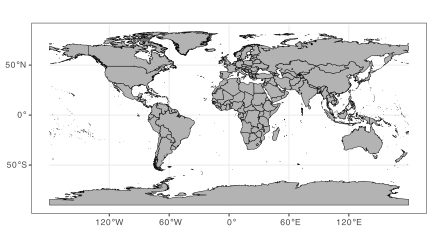
You can see above that Africa is centrally positioned. However, I want to focus on the western Pacific region. I am also going to apply a new projection (ESRI:53077, the Natural Earth projection) to it. The “rotation” is accomplished by setting lon_0=170 in the proj-string.
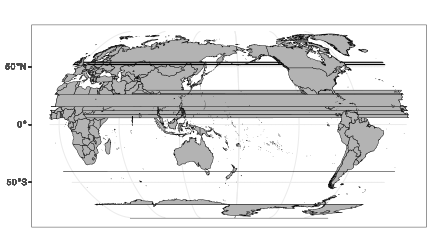
The western Pacific is now focal, but the map looks strange to say the least. This is a topological failure caused by how polygons cross the anti-meridian.
To separate the ideas:
- Projection choice: Natural Earth is reasonable for global context.
-
Central meridian choice: setting
lon_0 = 170is intentional to centre the Pacific. - Topology failure: polygons that cross the anti-meridian are now stitched together incorrectly.
This is why we must fix topology before projection. I can fix it using st_break_antimeridian(), but to do so I must start with unprojected data, and only then apply this function.
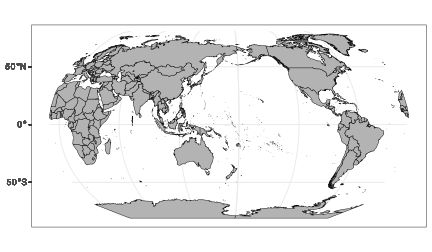
Reusable rule: If polygons cross the anti-meridian, repair topology in geographic coordinates before you project.
Silent failure warning: many maps will still look “fine” after a bad projection, but the geometry will be wrong. Always fix topology first, or you will eventually crop, dissolve, or measure the wrong shapes.
4 Zooming In
There are three options for focusing in on a particular area of the map (zooming in):
- selecting only certain areas of interest from the spatial dataset (e.g., only certain countries / continent(s) / etc.);
- cropping the geometries in the spatial dataset using
sf_crop(); - restricting the display window via
coord_sf().
I will look at each in some detail.
Here is the quick decision logic:
| Strategy | Best when… | Risk / downside |
|---|---|---|
| Select features | You want to keep whole countries/regions intact. | May exclude necessary context (e.g., partial islands). |
Crop geometry (st_crop) |
You want a tight, data-driven extent. | You are modifying the geometry (not just the view). |
View window (coord_sf) |
You want to preserve original geometries. | Easy to hide geometry problems and mislead readers. |
5 Selecting Areas of Interest
I am interested only in the “continent” called Oceania, which includes the Pacific Islands, Australia, and New Zealand. More correctly, it is a geographical region, not a continent. It is comprised of Australasia and Melanesia, Micronesia, and Polynesia which span the Eastern and Western Hemispheres.
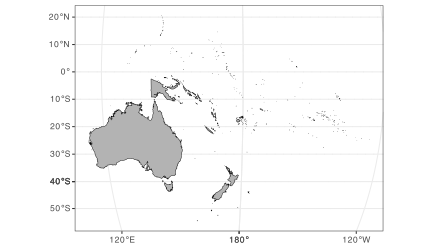
Zooming in on only the group of nations included with Oceania reveals another problem. This is, only part of New Guinea is displayed: Papua New Guinea appears on the map but the western side of New Guinea, called Western New Guinea, is absent. This is because Papua New Guinea is part of Micronesia whereas West New Guinea is part of Indonesia (part of the South-eastern Asia region).
There is no easy way to select the countries that constitute Australasia, Melanesia, Micronesia, Indonesia, and Polynesia — unless I create an exhaustive list of these small island nations. But I can use the countrycode package to insert an attribute with the geographic regional classification of the United Nations in the world_1 map. Now all the constituent countries belonging to these regions will be correctly classified to the UN regional classification scheme. Note that I also collapse the countries into their continents by merging all polygons belonging to the same continent (the group_by() and summarise() functions) — I do this because I do not want to display individual countries.
This region + dissolve workflow is advanced. You do not need to memorise it. Learn to recognise when you need:
- a classification table (UN regions),
- an attribute join,
- and a dissolve (
group_by()+summarise()).
library(countrycode)

world_1$region <- countrycode(world_1$iso_a3, origin = "iso3c",
  destination = "un.regionsub.name")

sw_pacific <- world_1 |>
  filter(region %in% c("Australia and New Zealand", "Melanesia", "Micronesia",
    "Indonesia", "Polynesia", "South-eastern Asia")) |>
  group_by(continent) |>
  summarise()

ggplot() +
  geom_sf(data = sw_pacific, colour = "black", fill = "grey70")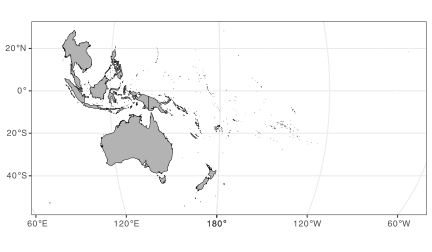
As we can see above, by including the South-eastern Asia region I complete the mass of land that is New Guinea.
6 Cropping
The above map is good but not perfect. I have in mind zooming in a bit more into the region around Fiji where the earthquake monitoring network is located. One way to do this is to crop the extent of the study region using a bounding box whose boundaries are defined by the extent of the quakes datapoints.
To start, I use the earthquake data, extract from there the study domain and increase the edges all round by a given margin — this is so that the stations are not plotted right on the map’s edges.
Important! The coordinates in the quakes data are provided in WGS84, so I need to first specify them as such, then transform them to the same coordinate system used by the map.
Why this is a good habit: a data-derived bounding box keeps your map honest. It is reproducible, it adapts if the data change, and it prevents you from “hand-drawing” an extent that hides inconvenient points.
quakes <- as_tibble(datasets::quakes)
margin <- 15.0
xmin <- min(quakes$long) - margin; xmax <- max(quakes$long) + margin
ymin <- min(quakes$lat) - margin; ymax <- max(quakes$lat) + margin

WGS84_proj <- "+proj=longlat +datum=WGS84 +no_defs +ellps=WGS84 +towgs84=0,0,0"

bbox <- st_sfc(st_point(c(xmin, ymin)), st_point(c(xmax, ymax)),
                         crs = WGS84_proj)
bbox_trans <- st_transform(bbox, NE_proj)

sw_pacific_cropped <- sw_pacific |>
  st_crop(bbox_trans)

ggplot() +
  geom_sf(data = sw_pacific_cropped, colour = "black", fill = "grey70")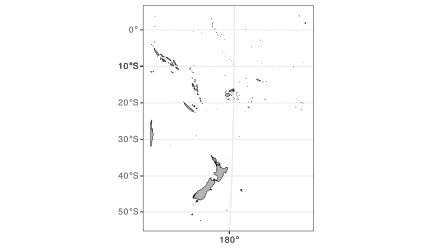
That looks decent enough, but there is another way to accomplish the same.
7 Setting the Mapping Limits in ggplot2
The third approach to get closer to the region of interest is to use the full map extent (the world) loaded at the beginning, but to set the limits of the view window within the coord_sf() function in ggplot().
To do this, I start with the bbox_sf_trans object, which was obtained by first specifying the coordinates marking the extent of the map in the WGS84 coordinate system, then transforming them to Natural Earth. We can extract the transformed limits withst_coordinates() and supply them to the map.
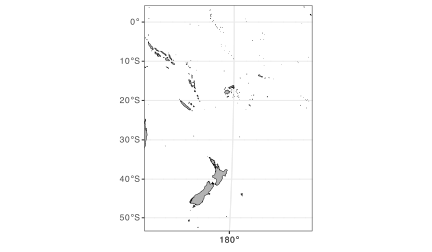
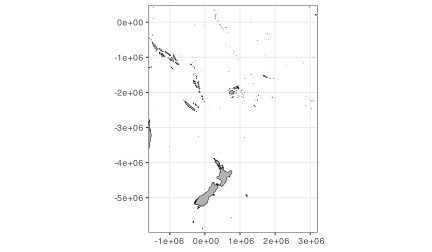
Great! This works well. Note that the coordinates on the graticule are in degrees longitude and latitude, the default for WGS84. By setting datum = NE_proj ensures the graticule is displayed in Natural Earth coordinate system units, which is meters. This might look strange at first, but it is not wrong.
coord_sf() can show correct graticule units that are unfamiliar to readers. If your audience expects degrees, a meter-based graticule can mislead even if it is technically correct. Always decide for communicative clarity, not just mathematical correctness.
8 Adding the quakes Data as Points
In order to plot the quakes data, I need to create a sf object from the quakes data. When converting the dataframe to class sf, I must also assign to it the CRS associated of the original dataset. This would be WGS84. Afterwards I will transform it to the Natural Earth CRS.
R> head(quakes_sf_trans)
Simple feature collection with 6 features and 3 fields
Geometry type: POINT
Dimension:     XY
Bounding box:  xmin: 1047820 ymin: -2923232 xmax: 1361900 ymax: -2017755
CRS:           +proj=natearth +lon_0=170
# A tibble: 6 × 4
  depth   mag stations           geometry
  <int> <dbl>    <int>        <POINT [m]>
1   562   4.8       41 (1104307 -2293735)
2   650   4.2       15 (1047820 -2316276)
3    42   5.4       43 (1323082 -2923232)
4   626   4.1       19 (1113132 -2017755)
5   649   4         11 (1136619 -2293735)
6   195   4         12 (1361900 -2210349)
I am going to make a map of the Fiji region and plot the spatial location of the earthquakes, and scale the points indicating the earthquakes’ magnitude by their intensity (mag).
Stylistic choices (these are not defaults):
- Star shapes draw attention and visually separate points from land polygons.
- Colour and size both map to magnitude to reinforce the same message (redundant encoding).
- The size legend is suppressed to avoid repeating the same information twice.
ggplot() +
  geom_sf(data = sw_pacific_cropped, colour = "black", fill = "grey70") +
  geom_sf(data = quakes_sf_trans, aes(colour = mag, size = mag),
    stat = "sf_coordinates",
    shape = "*", alpha = 0.4) +
  scale_colour_continuous(type = "viridis") +
  guides(size = "none") +
  coord_sf(expand = FALSE) +
  labs(x = NULL, y = NULL,
    title = "The Fiji Earthquake Data",
    subtitle = "Natural Earth")
Now I apply a more appropriate CRS to the map. This is the WGS 84 / NIWA Albers projection (EPSG:9191), which is designed for the southwestern Pacific and the Southern Ocean around New Zealand.
Why this is a better choice here:
- It is an equal-area projection, so area comparisons are meaningful.
- It centres the region of interest, reducing distortion where we care most.
- It matches the question (regional patterns in the SW Pacific), not just global aesthetics.
NIWA_Albers_proj <- "+proj=aea +lat_0=-22 +lon_0=175 +lat_1=-20 +lat_2=-30 +x_0=0 +y_0=0 +datum=WGS84 +units=m +no_defs +type=crs"

ggplot() +
  geom_sf(data = sw_pacific_cropped, colour = "indianred", fill = "beige") +
  geom_sf(data = quakes_sf_trans, aes(colour = mag, size = mag),
    stat = "sf_coordinates",
    shape = "*", alpha = 0.6) +
  scale_colour_continuous(type = "viridis") +
  guides(size = "none",
    colour = guide_colourbar("Magnitude")) +
  coord_sf(expand = FALSE,
    crs = NIWA_Albers_proj) +
  labs(x = NULL, y = NULL,
    title = "The Fiji Earthquake Data",
    subtitle = "WGS 84 / NIWA Albers") +
theme_minimal() 
9 CRS Decision Checklist
Before writing mapping code, ask:
-
What is my data’s native CRS? Check with
st_crs(). - Do I need metric units? If yes, project before measuring/cropping.
- What should be preserved? Area, distance, or shape?
- Where is my region of interest? Choose a projection that minimises distortion there.
10 Explicit Failure Modes
These are the mistakes that quietly ruin maps:
- Mismatched CRS between layers (data align but are actually offset).
- Cropping in the wrong CRS (degree-based bounds applied to projected data).
- Projection before topology repair (anti-meridian polygons break).
11 Conceptual Summary
This chapter is about reasoning with spatial data. You learned to:
- check CRS as a habit,
- treat projection artefacts as topological problems,
- choose zooming strategies intentionally,
- and justify a projection based on the question you are asking.
12 CRS and Spatial Workflow Decision Tree
Use this before you write a single line of mapping code:
Start
 |
 |-- What CRS is my data in? ----> st_crs()
 |        |
 |        |-- Geographic (degrees)? --> If you need metric units, project.
 |        |-- Projected (meters)? ----> Ensure all layers match.
 |
 |-- Do polygons cross the anti-meridian?
 |        |
 |        |-- Yes --> Fix topology in geographic CRS (st_break_antimeridian)
 |        |           THEN project.
 |        |-- No  --> Continue.
 |
 |-- What is my goal?
 |        |
 |        |-- Preserve area? ----> Choose an equal-area projection.
 |        |-- Preserve distance? -> Choose an equidistant projection.
 |        |-- Preserve shape? ----> Choose a conformal projection.
 |
 |-- How to zoom?
 |        |
 |        |-- Need whole features? -> Select features.
 |        |-- Need tight extent? ----> st_crop() (geometry changes).
 |        |-- Need full geometry? ---> coord_sf() (view only).
 |
 |-- Final check
          |
          |-- Are layers aligned? Are units clear to readers?
Reuse
Citation
@online{smit2021,
  author = {Smit, A. J.},
  title = {12. {The} {Fiji} {Earthquake} {Data}},
  date = {2021-01-01},
  url = {https://tangledbank.netlify.app/BCB744/intro_r/12-mapping_quakes.html},
  langid = {en}
}