2. Rmarkdown and Quarto

1 Introduction to R Markdown in Quarto
1.1 What is Markdown?
Markdown is a lightweight markup language that is designed for formatting text in a simple and readable way. It allows you to create formatted documents using a plain text editor, using symbols like # for headings, * or - for bullet lists, and other intuitive shortcuts. This makes it much easier to write well-structured documents compared to traditional word processors, especially for scientific and academic writing.
1.2 R Markdown: Integrating Code and Text
R Markdown is an extension of Markdown that allows you to embed code—such as R, Python, or Julia—directly into your text. This means you can integrate both your narrative (your explanations, interpretation, and discussion) and your code (data analysis, statistics, plots) into a single document. When this document is rendered, both the text and the outputs of your code (including tables and figures) are combined together into a final report.
R Markdown is very useful in all areas of research because it allows you to:
- Prepare transparent, reproducible reports
- Embed statistically rigorous analyses directly alongside your commentary
- Seamlessly incorporate tables and graphics generated by
R - Write entre books
- Even this website, Tangled Bank, was written entirely in
RMarkdown (in Quarto–see below)
1.3 Using R Markdown in Quarto
Quarto is a modern open-source scientific and technical publishing system. It is essentially the successor to the older R Markdown system, and supports a range of programming languages in addition to R.
1.3.1 Important Features
- Write content in a human-readable format using Markdown
- Include code chunks using triple backticks, specifying the language—e.g.
```{r}at the start and```at the end of the chunk forR - Supports citations and bibliographies
- Automatically generates formatted outputs such as PDF, HTML, and Word
1.3.2 Document Structure
A basic R Markdown (as implemented in Quarto) document has three main elements:
- YAML Header: At the very top, enclosed by three dashes
---, specifying basic document metadata (such as title, author, output format) - Narrative Text: Written in Markdown, supporting headings, lists, emphasis, tables, and more
- Code Chunks: Segments of code embedded in the narrative and enclosed using triple backticks with curly braces indicating the language
1.3.3 Example Skeleton
---
title: "R Markdown and Quarto Demo"
author: "AJ Smit"
date: "29/07/2025"
bibliography: ../references.bib
citation: true
format:
  html:
    code-fold: false
    embed-resources: true
    number-depth: 3
    number-sections: true
  docx: default
---

## Introduction

This study is about air quality.

## Methods

### Data

The dataset used in this study is the `airquality` dataset from R, which contains daily
air quality measurements in New York from May to September 1973. The dataset includes
variables such as ozone levels, solar radiation, wind speed, and temperature.

### Analysis

The R script in the code chunk further explores the impact of temperature on ozone level.
All analyses were done in R [@R2025].

This is **bold** text. This is *italicised* text.

```{r}
#| label: fig-airquality
#| fig-width: 6
#| fig-height: 4
#| fig-cap-location: bottom
#| fig-cap: "Temperature and ozone level."
#| warning: false

library(ggplot2)

ggplot(airquality, aes(Temp, Ozone)) +
  geom_point() +
  geom_smooth(method = "loess")
```

## Results

The results show that air has quality (@fig-airquality).
In the Example Skeleton, Lines 1-15 are called the YAML header, which contains metadata about the document. Initially, you’ll not want to include the YAML lines bibliography: ../references.bib and citation: true since you will not have a bibliography file set up yet. The citation: true option is used to enable citations in the document, and you may read more about it elsewhere. A very important part of the YAML header is the statement embed-resources: true which ensures that any images or other resources such as the theming styles etc. used in the document are embedded directly into the HTML output, making it self-contained and portable – this is essential when you want to share your document with others, publish it online, or submit it for grading.
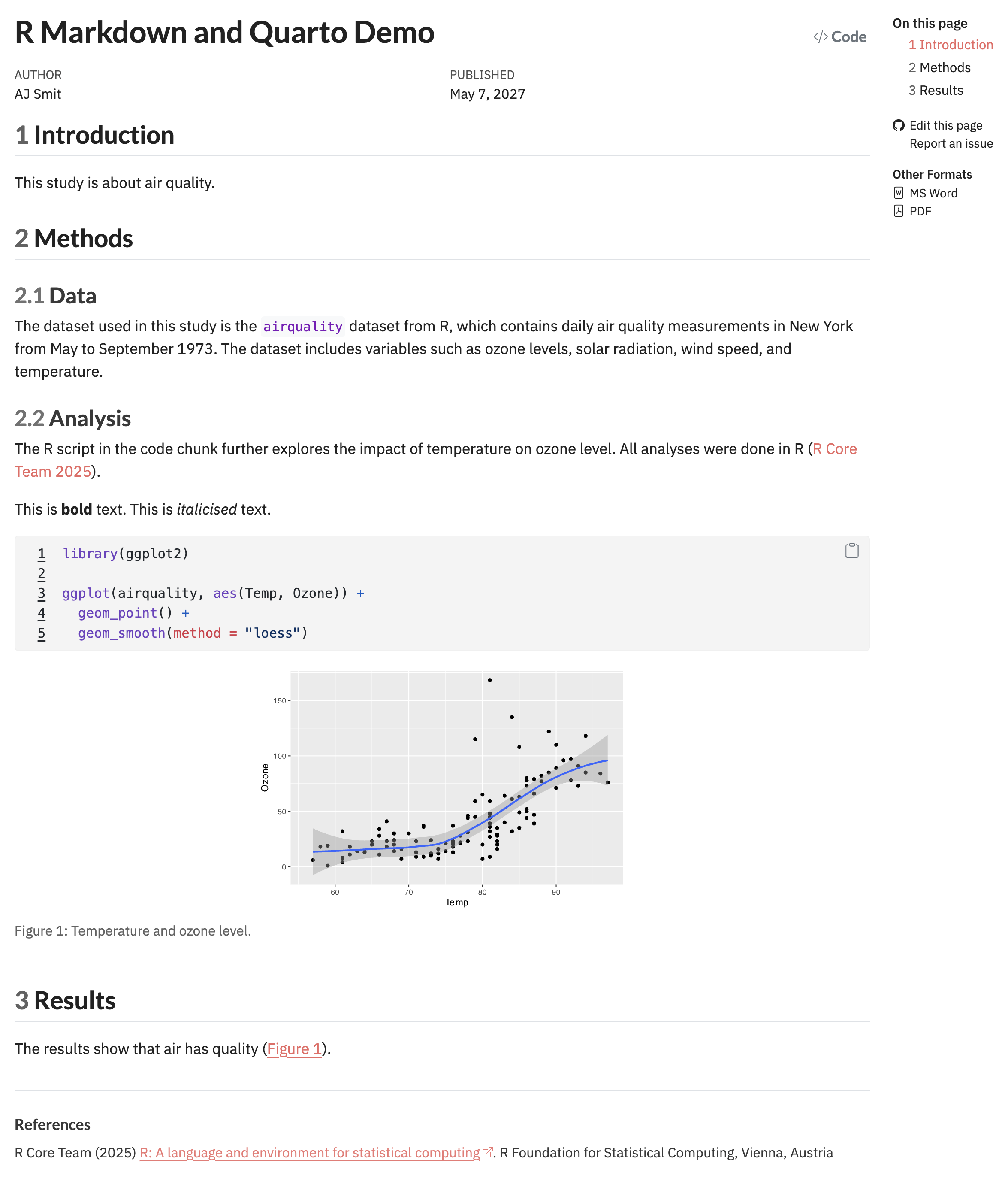
Lines 17-34 in the YAML header are the first two sections (two level one headings, “Introduction” and “Methods”, the latter with two level three headings beneath is, i.e., “Data” and “Analysis”) of the document. Lines 36-49 are the code chunk, which is where we embed our R code. The #| fig-cap option in the code chunk specifies the caption for the figure that will be generated, and you can cross reference this using @fig-airquality in your next block of body text. The code chunk itself generates a figure that shows the relationship between temperature and ozone level in the airquality dataset. Notice also how I have cited a reference, @R2025, which is a reference to the R software itself, which is specified in the bibliography file references.bib (which you will need to create in your own time).
When you render this file, you’ll see the following output (the HTML output shown):
1.3.4 Supported Output Formats
By changing the format option in the YAML header, you can export your report to different types including:
- PDF documents (provided you have LaTeX installed)
- HTML web pages
- Word (.docx) documents
For example:
or
1.3.5 Rendering the Document
- In RStudio or VS Code, you can click the ‘Render’ or ‘Knit’ button to produce your desired output.
- You can also use the command line:
$ quarto render my_file.qmd$
1.4 More Detailed information
Please refer to the Markdown Basics page on the Quarto website for much more information about markdown.
Quarto is extremely powerful and you’ll want to explore the Markdown Basics page thoroughly in your own time. Of immediate interest to most of you will be the page on Citations, or the other information under “Scholarly Writing” that you may access in the menu on the left of the page.
You will also have to explore the various YAML options, YAML meaning ‘Yet Another Markup Language’. You can specify these at the beginning of your document in the YAML block at the top, which allows you to define various options for how your HTML, Word document, PDF, or any of the many formats that Quarto can produce, will look. Please consult the reference section on the Quarto website for the various YAML options available (e.g., here the HTML YAML options), so that you can set up your document in the way you would like it to appear.
One thing to note about YAML is that it is incredibly particular about the way in which the various levels of indentation must appear in order for the YAML to be read correctly by your Quarto system and for the code to execute correctly. So, this is an excellent opportunity for you to pay attention to detail and ensure that your YAML is precisely structured according to the expectations of the example document provided.
1.5 Why Use R Markdown?
- Ensures your analyses are reproducible
- Allows collaboration between researchers
- Combines field notes, data analysis, results, and interpretation in one place
Reuse
Citation
@online{smit,_a._j.2026,
  author = {Smit, A. J.,},
  title = {2. {Rmarkdown} and {Quarto}},
  date = {2026-01-20},
  url = {http://tangledbank.netlify.app/BCB744/intro_r/02-quarto.html},
  langid = {en}
}